p5.js is a free JavaScript library for drawing with code, and one of the easiest ways into generative art. Instead of drawing every line yourself, you write a few simple rules, like where a line starts and which way it bends, and let the code make the picture. You don't need to be a programmer for this anymore. You can describe what you want to an AI, paste the code into your browser, and spend most of your time playing with what comes out. Below is how a sketch works, what to ask the AI for, and where to find inspiration.
What p5.js does
p5.js gives you a canvas in the browser and simple commands to draw on it: circle(), line(), fill(). It's free, open source and part of the Processing community, and it's made for artists, designers, educators and beginners, so the commands read almost like instructions to a person.
Unlike Three.js, which is built for 3D scenes, or Rive, which is built for designed animations, p5.js is built for sketching: short programs, fast experiments, results you can see immediately. A complete piece is often under 50 lines.
The six pieces of every sketch
| Piece | What it is | Think of it as |
|---|---|---|
| Canvas | The drawing area, made with createCanvas(width, height). (0, 0) is the top-left corner | The paper |
setup() | Runs once at the start: canvas size, background, starting values | Preparing the studio |
draw() | Runs again and again, about 60 times a second, until you call noLoop() | The hand that keeps drawing |
| Shapes and color | circle, rect, line, beginShape, plus fill, stroke and transparency | Brushes and paint |
| Randomness | random() jumps anywhere. noise() (Perlin noise) changes smoothly, so nearby inputs give nearby results | The happy accidents |
| Input and output | mouseX, mouseY and keys to interact. saveCanvas() and saveGif() to export | Your hands and the frame |
The difference between random() and noise() is most of the craft. Random looks like static. Noise looks like wind, water, wood grain or terrain.
How a sketch runs
Here's a full sketch. Paste it into the p5.js Web Editor and press play:
function setup() {
  createCanvas(600, 600);
  background(245, 240, 230);
  noiseSeed(7);
  randomSeed(7);
  stroke(40, 50, 30, 40);
  noFill();
}

function draw() {
  // Each frame, start a line somewhere random...
  let x = random(width);
  let y = random(height);
  beginShape();
  for (let i = 0; i < 80; i++) {
    vertex(x, y);
    // ...and let the noise decide which way it bends at every step
    let angle = noise(x * 0.005, y * 0.005) * TWO_PI * 2;
    x += cos(angle) * 4;
    y += sin(angle) * 4;
  }
  endShape();
  if (frameCount > 600) noLoop();
}
setup() prepares a cream canvas and a thin, see-through green pen. draw() adds one line per frame. Each line asks the noise field which direction to go, so all 600 lines flow together like hair or currents. That technique is called a flow field. Here's what it draws once all 600 lines are in:
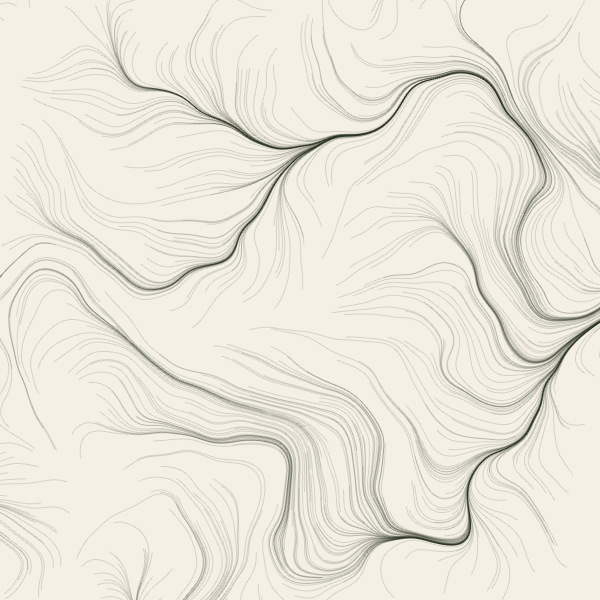
Change 0.005 to 0.02 and the flow gets twistier. Change the seed and you get a new piece from the same rules.
Words that get better art from AI
"Make me generative art" gets you something generic. Naming a technique gets you something you can steer.
| Technique | What it looks like | Ask for |
|---|---|---|
| Flow field | Lines following invisible currents | "a flow field driven by Perlin noise" |
| Circle packing | Circles filling a space without overlapping | "circle packing with varied sizes" |
| Recursion | Branches, trees, shapes inside shapes | "a recursive tree that branches randomly" |
| Truchet tiles | A grid of rotated tiles forming maze-like patterns | "Truchet tiles on a grid" |
| Particle system | Many small dots moving under forces | "particles attracted to the mouse" |
| Grid with variation | Rows of the same shape, each slightly off | "a grid of shapes, each rotated and scaled by noise" |
Four more things to put in every prompt:
- "Use p5.js v2." Version 2 is now the default, and it removed
preload()and changed some shape functions. Most p5.js code online was written for v1, so AI tools may give you v1 code that won't run. - "Put the parameters at the top as constants." Then you can tweak colors, counts and scale yourself without asking again.
- "Seed the randomness." With
randomSeed()andnoiseSeed(), the same seed always draws the same piece, so you can get a favorite back. - Describe a palette, not "colorful." For example: "four colors: cream background, deep olive, rust, soft gold."
Pick your setup
| If you want to... | Use | Why |
|---|---|---|
| Start in the next minute | p5.js Web Editor | Free, in the browser, nothing to install. Paste AI code and press play |
| Share and remix with others | OpenProcessing | A community gallery where every sketch shows its code |
| Iterate fast with an agent | Claude Code or Codex in a folder with index.html and sketch.js | The agent edits, you refresh the browser and react |
| Put a sketch on your site | p5.js from a CDN or npm | Use "instance mode" in React or Next.js so p5 doesn't clash with your other code |
Keep the good ones
- Write down the seed of every output you like. It's the only way back to it.
- Export with
saveCanvas()for an image orsaveGif()for a loop. - Stop when it's done. Static pieces should call
noLoop(), ordraw()keeps running 60 times a second for nothing. - Change one thing at a time. Ask for one change per prompt. Big rewrites lose the version you liked.
- Keep a copy before each big change, in the editor's file list or in Git.
Work worth studying
- OpenProcessing: thousands of sketches with their code visible. Find a style you like and read how it's made.
- Tyler Hobbs on flow fields: the artist behind Fidenza, a widely known generative art series, explains the technique it's built on.
- Genuary: a daily prompt every January for making generative art. The past prompt lists are a ready-made idea bank.
- The Nature of Code: Daniel Shiffman's free online book on simulating nature with p5.js: randomness, forces, particles, fractals.
- The Coding Train: Shiffman's videos, including coding challenges that build one generative technique per episode.
Your first piece
Open the p5.js Web Editor in one tab and your AI tool in another. Paste this, then copy the code it returns into the editor:
Write a p5.js v2 sketch for the p5.js Web Editor (a single sketch.js). Make a generative art piece using [technique, e.g. a flow field driven by Perlin noise] on a 600x600 canvas. Palette: [your 3-5 colors]. Put every parameter at the top as named constants, seed the randomness with randomSeed and noiseSeed, stop drawing with noLoop when the piece is finished, and press S to save it as a PNG. Briefly explain what each constant does.
Then change one constant at a time and watch what happens. Once you know which knobs matter, ask for a new technique and repeat.
Go deeper: p5.js examples · v2 transition guide · Three.js: real-time 3D you build with code · Rive: animations that react